One structured workspace for every online client
The Online Coaching Hub replaces the spreadsheet most online coaches run on. Each client’s intake, nutrition, training, check-ins and progress photos sit together, organised across the weeks of their program.


Early access, for any coach on any plan, including the free one. Switch it on in Settings.
Onboarding
Clients complete their intake before anything opens. Their goals, nutrition, training preferences and equipment, your contract, and an onboarding checklist that you control.
- Client intake
- Your contract
- Client agreement
- Onboarding checklist
Training
Build a template and generate the weeks. Use a weekly or rotation split, generate workouts for as many weeks as you need, and sync changes to the workouts still to come.
- Weekly or rotation splits
- Generate workouts
- Sync template changes
- Prescribed next to actual
Check-ins
Your check-in day, laid out for you. Daily entries, weekly answers and their weight trend together, week by week, so a batch of check-ins goes much faster.
- Daily body weight
- 1-5 ratings you choose
- Weekly wins and challenges
- Your feedback
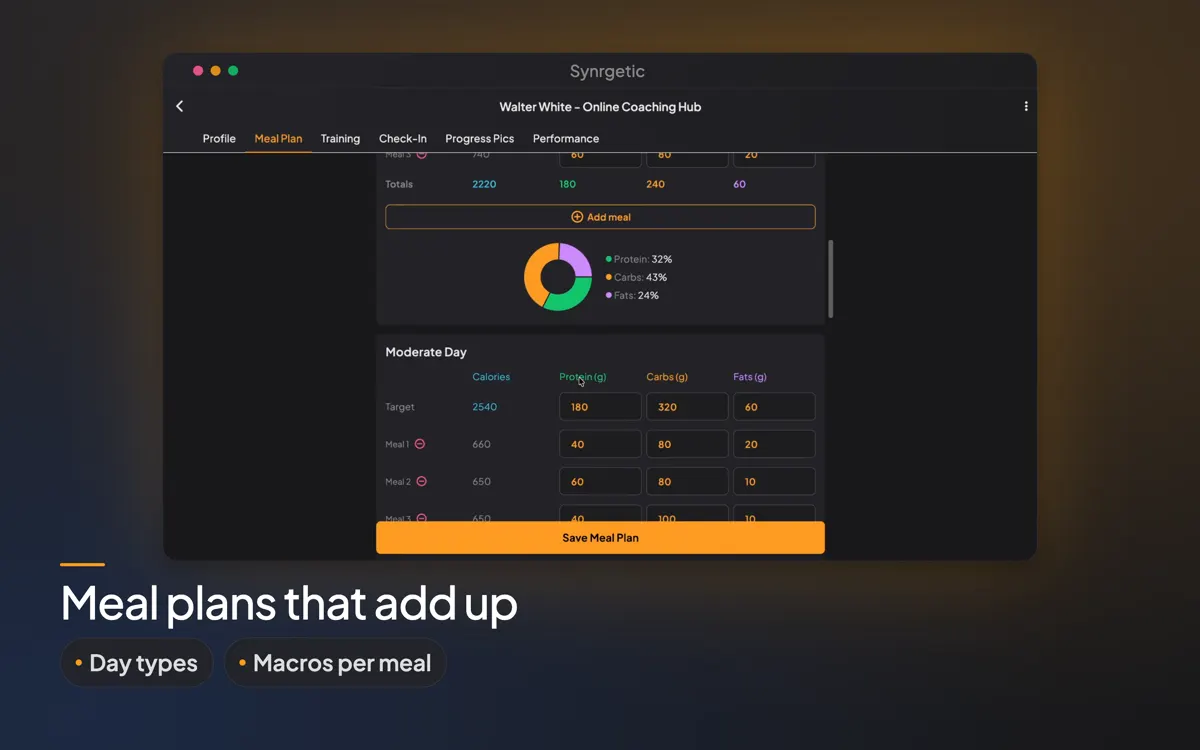
Nutrition
Targets for low, moderate and high days. Each day type has its own calorie and macro targets, alongside your client's meal plans.
- Day types
- Calorie and macro targets
- Meal plans
Shape it to how you coach
Choose what your clients see and fill in: the onboarding checklist, the intake profile, your check-in sections, your agreement and the equipment list. Turn the Hub off whenever you like. Nothing is deleted, and everything is where you left it when you switch it back on.
Frequently asked questions
What does the Online Coaching Hub cost?
It is included on every plan during early access, including the free plan.
How do I turn on the Hub?
In Coach mode, open Settings and switch on Online Coaching Hub (Early access). A laptop icon then appears on each client, and you can switch the Hub on for them.
What happens to my data if I switch the Hub off?
The Hub disappears for you and your clients, but nothing is deleted. When you switch it back on, every client's profile, plans, check-ins and progress photos are where you left them.
Try the Hub with your first client, free.
Your first client is free, forever · Every paid plan starts with a one-month free trial · Cancel anytime
Plans are bought in the iPhone, Android or Mac app. Once you have one, it works on the web too.